
SANDISK SOLID STATE DRIVE CONVERSION KIT

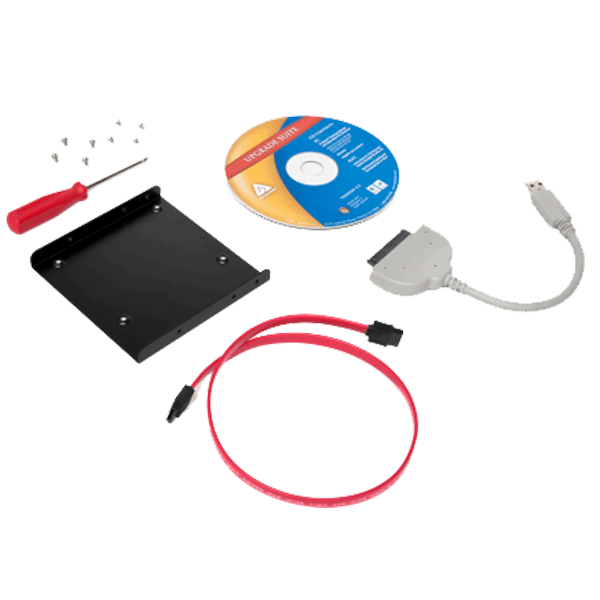
SANDISK SOLID STATE DRIVE CONVERSION KIT
The SanDisk Solid State Drive Conversion Kit (SDSSDCK-AAA-G27) simplifies upgrading your computer’s traditional hard drive (HDD) to a faster, more responsive solid-state drive (SSD). This kit provides the necessary hardware and software to facilitate the upgrade process, even for users with limited technical experience.
Here’s a breakdown of the kit’s components and functionalities:
Hardware:
- 3.5-inch Mounting Bracket and Screws: This bracket allows you to physically mount the smaller 2.5-inch SSD into the larger 3.5-inch slot typically occupied by a traditional HDD in desktop computers.
- SATA Data Cable: This cable connects the SSD to your computer’s motherboard, enabling data transfer between the drive and the system.
- SATA-to-USB Cable: This cable allows you to connect the old HDD to your computer via USB after its removal, facilitating data transfer from the old drive to the new SSD.
- Screwdriver: A basic screwdriver is included for convenient installation of the mounting bracket and screws.
Software:
- Apricorn EZ Gig IV with Data Select: This software helps you clone the contents of your old HDD, including your operating system, applications, and files, onto the new SSD. This ensures a smooth transition and minimizes data loss during the upgrade process.
Please note that the SSD itself is not included in the kit and needs to be purchased separately. The kit is compatible with a wide range of SSDs, allowing you to choose the capacity and performance that best suit your needs and budget.
The SanDisk Solid State Drive Conversion Kit offers a convenient and user-friendly solution for upgrading your computer to an SSD, potentially resulting in significant improvements in boot times, application loading speeds, and overall system responsiveness.
Here are some additional points to consider:
- System Requirements: Ensure your computer meets the minimum system requirements specified by the manufacturer for the kit to function properly. These typically include having a CD-ROM drive and a USB port.
- Technical Expertise: While the kit aims to be user-friendly, some level of technical knowledge might be helpful during the installation and cloning process. Consulting online resources or user manuals can be beneficial for a smooth experience.
- Alternative Solutions: If you’re comfortable with data transfer procedures and have the necessary tools, you can perform the HDD to SSD upgrade without a conversion kit, although it might involve gathering the individual components and potentially utilizing different software solutions.
Order HERE today.


Reviews
There are no reviews yet.